Showing posts with label positive airflow. Show all posts

Saturday, 8 September 2012

Build 99% complete


So the last thing I needed to set up the X79 came in and I was set to move everything over.  I took advantage of having no motherboard in the chassis and nibbled away the rear grill as per ehume in the air flow thread.

The nibbler is actually quite easy to use.  The blade runs at a 180 degree angle perpendicular to the surface being cut as opposed to the 90 degrees that a pair off scissors would.


A downside to this is that its hard to see if your cuts are neat and straight.  I made a little mess of things.  I'll just throw some U-channel moulding on this later on instead.
Line up of the PCIe cards I would be testing on the new motherboard.  The Auzentech Hometheater HD turned out to be completely dead on the analogue ports.  I was foolishly hoping it was some sort of OS error on my previous build.
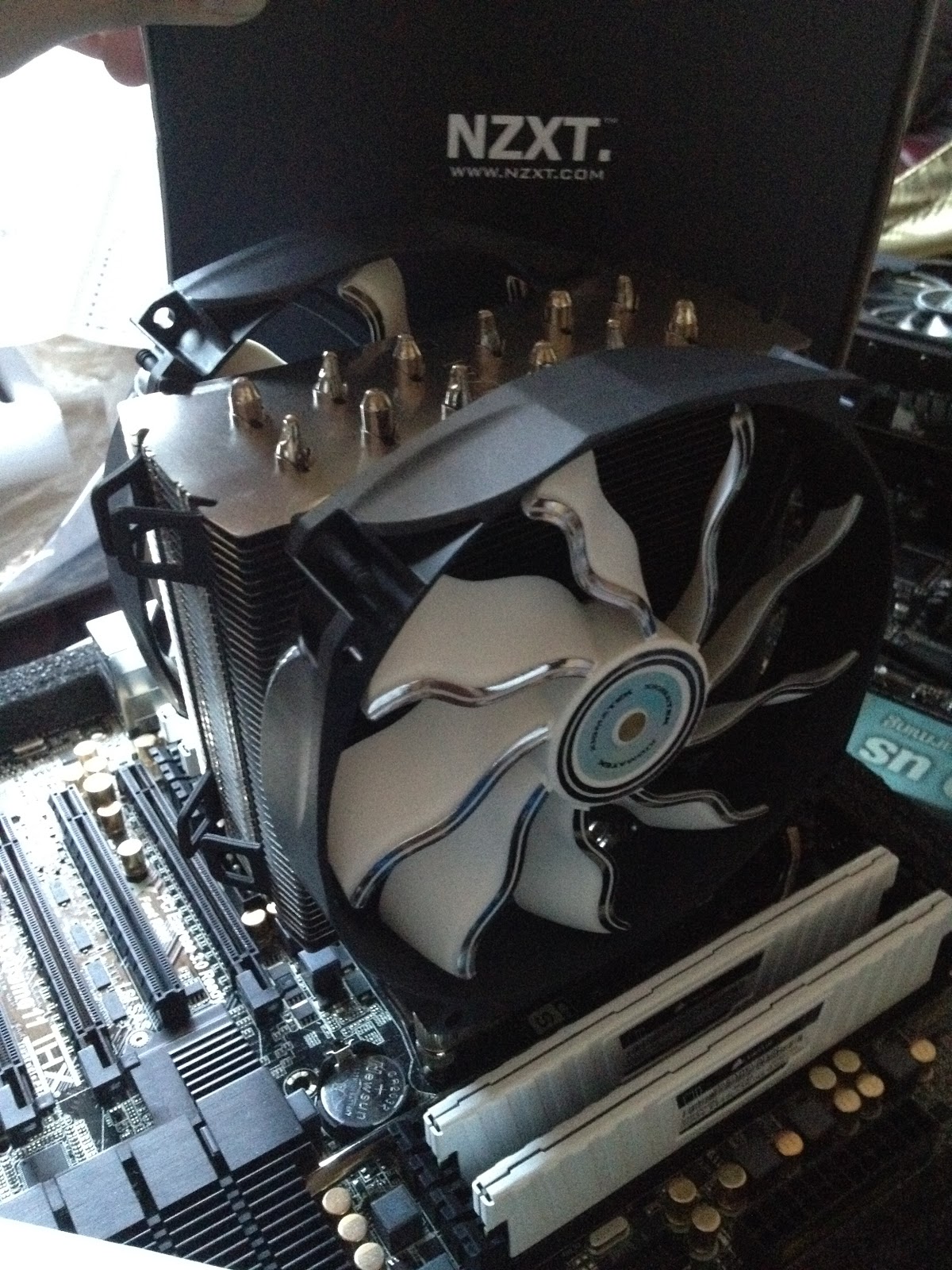
The monstrous NZXT Havik 140 with stock fans replaced with a couple of pwm Xigmatek XAF-F1452.  Pretty much the same fan with some silver accents.  It also seemed a tad noisier with a mechanical whirl amongst the air movement.  At the lowest speed of 800rpm its nonexistent but at the peak of 1300rpm it is there.  Not that its incredibly audible but the difference can be observed if you are listening for it.

The 2011 mounting screws save a tonne of time with this cooler as well as there is no need for a backplate whatsoever.
Here is pretty much the final build internally, although some more lights will be added later and the cables could be managed a little better.  I was wanting a way to show off the SSD a little more but it gets covered up by the side panel anyway.


A little something I had planned to test for a long time. My Blackmagic Intensity Pro mounted into the vertical expansion slot of my chassis.  The slot is usually reserved for extra rear USB slots or fan controllers but I figured that with the size of this card, it might just work.  I used a PCIe riser to get the card to have its signal sent to the motherboard.  It works like a charm! =D


The side panel fitted with the original Havik 140 fan mounted to the side as an intake for the multi GPU setup.


Money shot.  I plan to use smaller cold cathodes instead of the long LED so that I can better highlight the white UV components. 

Wednesday, 23 May 2012

Build revisions and airflow management

So after doing some further extensive research, the GTX 690 (even though its an amazing looking card and possibly the best engineered piece of pc hardware in terms of the consumer market) is just way too overpriced and scarce to remain in this build as a viable option.  In the end, my current set up of a single 2560 x 1440 display will be very comfortably run with a dual GTX 670 set up with a possible expansion to a third should things get hairy.  3 of those would actually come to about the price of 1 GTX 690 so not all is a compromise.  Sure there will be some drawbacks in regards to PCIe lanes but at the resolution I need there won't likely be an issue with losing 1 or 2 fps.  Onto the custom makes and clocks then!  I've found the perfect card in the ASUS Geforce GTX 670 DirectCU II TOP.  It's extremely quiet.  Almost 10 dB quieter than my current set up of 1 GTX 480.  Add to that the fact that it pushes at clock speeds higher than a standard GTX 680 and its an absolute winner!  Theres also a slick rear backplate that, along with the heatpipes, compliments my black and white colour scheme perfectly.  The red accents won't be visible with the cards pointed downwards so that isn't an issue at all.


One thing that I do have to take close note of is that the cooler design, whilst amazing and very efficient in its purpose of keeping the GPU quiet and cool, is also releasing hot air back into the chassis rather than all out its rear.  Because of that I will need to keep the cooler well ventilated.  So I did a little research into positive and negative airflow and how to keep my case at good temperatures purely on air.  I came across this incredible thread on overclock.net (How to decide on a case for air cooling) that outlines how positive airflow allows a case to be kept cool at lower fan RPMs, and consequently, lower noise levels.  The diagram below is from the thread's original poster ehume. The rest of the thread is filled with users reporting amazing results using this theory as a basis.
Basically rather than a case with negative pressure (more exhaust fans than intake fans) or positive pressure (more intake fans than exhaust fans) a positive 'flow' is the approach taken.  There are no exhaust fans and the rear expansion slots and fan grill are removed to allow an open flow of hot air out the back of the chassis.  The rest of the case is then fitted with fans taking in air which forces all hot air in one direction whilst allowing a constant flow of cool air over the main components.  Since there is no fan that hot air is being filtered through, the exhaust simply flows out as fast as it can rather than waiting in line for the gate like exhaust fan to push it through.  This actually requires the physical destruction of the rear fan grill if the chassis has one.  So I may go for an exhaust fan at higher RPM to first see how that goes for me.  Another interesting fact that is mentioned is that because the case will always be filled with air in almost every nook dust hardly ever settles, so the case remains virtually dust free.  That definitely is something to look forward to!

One final thing I must mention is that due to the nature of my builds colour scheme, and the choice of the GA-X79-UD3 motherboard, I have limited my SATA III ports.  A quick bit of research brings to my attention the IBM M1015 pcie expansion card that brings with it the flexibility of 8 SATA 6Gb/s for some awesome RAID setups.  May just be the thing I need if I ever require more than 2 SSDs.